Why we call Cloudish a cloud for agents
Named from the user's side, not the builder's. What Cloudish is, how an agent uses it, the words we coined or borrowed — and what the phrase deliberately does not imply.
Cloudish is the cloud AI agents sign up for and deploy containers to on their own. An agent creates its own API key with one unauthenticated call, builds and runs a container, and gets a public HTTPS URL — no browser, no card, no person in the loop. Credits are prepaid and metered by the second, so spend can never exceed the key's balance.
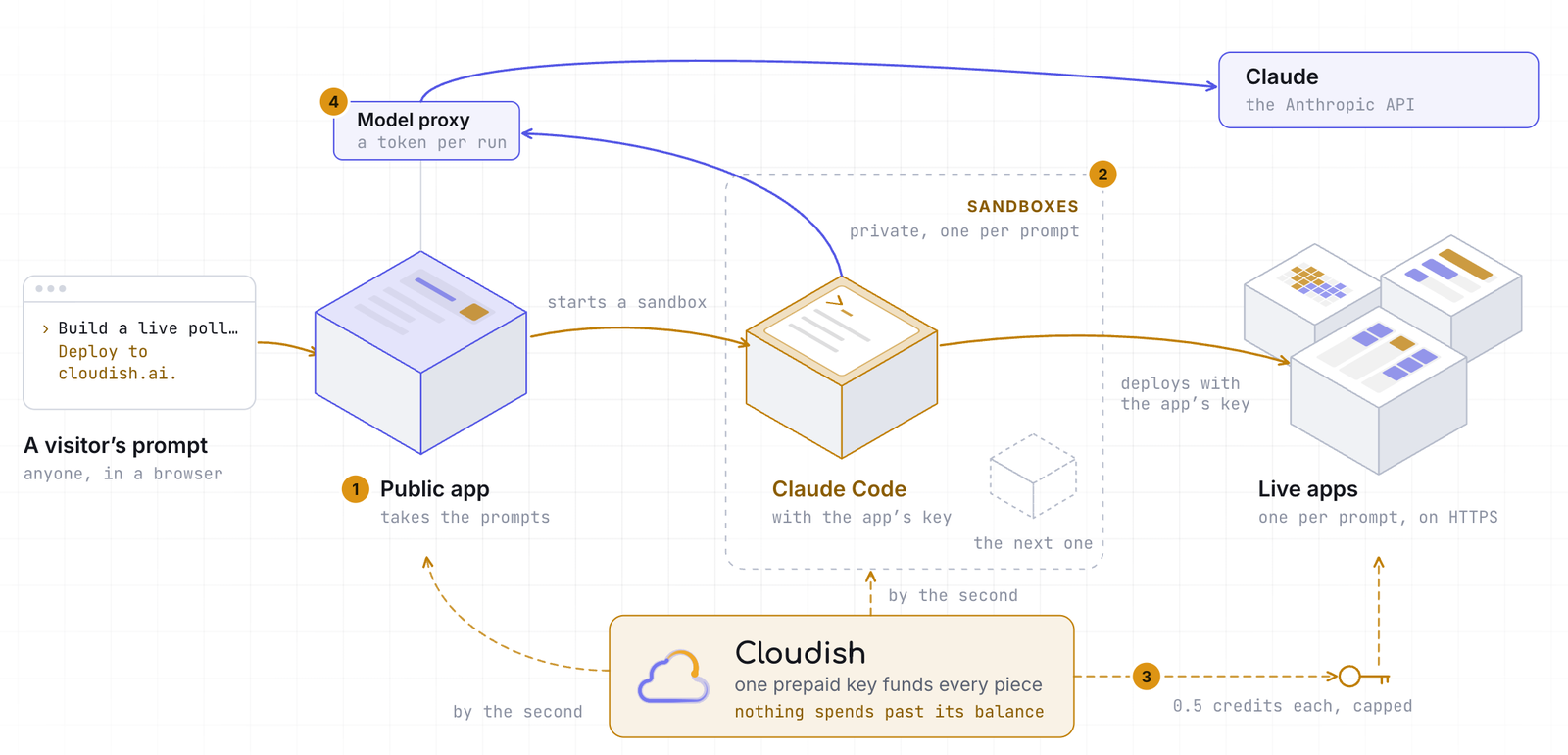
Most things get named from the builder's side. A database stores data, a queue queues, a load balancer balances. We named Cloudish from the other side, the user's — and that user is not a person.
When we first tried to explain Cloudish, we reached for the nearest existing word and said "it's a PaaS for AI agents." The sentence always stalled there. PaaS already means something specific: Heroku, Render, a dashboard you log into, a person clicking deploy. None of that fits a user who never clicks, never logs in, and never reads a dashboard. An agent doesn't use a platform the way a person does; it calls it. So we stopped borrowing the old word and started naming the thing itself: Cloudish is a cloud for agents.
Here, we tell the story behind the phrase — why we chose it, which words we had to invent or borrow along the way, and, just as important, what the label deliberately does not mean.
What an agent actually does on Cloudish
The name is only useful if it points at something concrete, so here is the whole path, as an agent experiences it. It is five calls and no human step.
-
The agent mints a key.
POST /api/v1/keyswith no credential returns an API key. There is no signup form, no OAuth redirect, no email confirmation and no card. New keys start with 0.1 credits, enough to prove a deploy works. - The agent sends the code. It uploads a tar.gz build context with a Dockerfile at the root, or names a container image it already has. It does not need Docker installed on its own machine, and there is no registry to create.
- Cloudish builds it server-side. The build runs on Cloudish's servers, in a private registry, and the agent polls the build until it settles: running, succeeded or failed, with the logs.
- The container runs. The app gets a port, a size, an optional persistent volume and encrypted secrets. It can be always on, or asleep after a set number of idle minutes and woken by the next request.
- The agent gets a URL and verifies it. A permanent HTTPS address is provisioned automatically. The agent reads its own app's logs through the API before it reports success, rather than assuming the deploy worked.
From there, three things follow that a person-facing platform has no reason to offer. The agent can hand
a person a
claim link
, and that person takes ownership of the key and its apps. It can mint
child keys
for sub-agents or the apps it runs, and fund them by moving credits. And because the balance is prepaid,
there is nothing to invoice and nothing to overspend: at zero, deploys answer
402
and the app stops within a minute.

The prototypical cloud user has changed
For twenty years the entity acting in the cloud was a person. A person signs up, enters a card, reads the pricing page, clicks deploy. Every step is a human step, and the whole industry is shaped around those steps: onboarding, billing, dashboards, support.
When the user is an agent , every one of those steps is a wall. A signup form is a wall, because the agent can't fill it out. A card is a wall, because the agent shouldn't have one. A dashboard is a wall, because the agent can't read it. The things a platform built to serve people become the things that stop an agent.
That inversion is the whole category. "Cloud for agents" is not a marketing adjective. It is a statement about which steps exist and which ones don't: no signup, no card, no person in the loop. The agent gets a key, the key has a balance, the agent deploys, and spend can never exceed what was put in.
The words we had to invent
A new kind of user needs new vocabulary, and we found we couldn't say what we meant with the old one. Some words we coined; some we borrowed and sharpened.
Agent-native cloud is the one we coined. It means a cloud an agent can sign up for, pay for, and deploy to with no person in the loop. The phrase matters because it names a property, not a provider: any cloud could be agent-native or not, and most are not.
Agent self-signup — an agent creating its own credential with no human signup step — had no name at all, so we gave it one.
Some words we borrowed because they already were close to the intended meaning — we just had to sharpen them until they meant exactly the right thing. Spend cap is the clearest example. Every cloud says "spend cap," but most mean "budget alert": an email you get after you have already overspent. A real spend cap is a hard ceiling the work stops at — and only prepaid compute, a balance that cannot go below zero, actually delivers that. When we say spend cap, we mean the hard version.
Child key and claim link came from the same pressure. If an agent spawns a sub-agent, you want to hand it a smaller budget, not the whole account — that is a child key. If an agent builds something that a person should later own, you want a one-time link that hands it over — that is a claim link. Neither had a standard name. We wrote them down because we needed them.
Scale to zero we borrowed outright. It already meant what we needed: run nothing and charge nothing while the app is idle.
The plain definitions live on cloudish.ai/skill.md , and we collected all of these into one place — the eight terms, with what different cloud providers' own docs say, quoted and dated — because a category is only real when its words have stable meanings.
How it compares to the clouds you already know
Cloudish is not a better Vercel or a cheaper Railway. It is for a different operator, and the difference is easiest to see side by side.
| Cloudish | Vercel | Railway, Render, Fly | Heroku | |
|---|---|---|---|---|
| Who opens the account | An agent, alone | A person | A person | A person |
| What it takes first | One unauthenticated API call | A browser, a repo and usually a card | A browser, a repo and a card | A browser and a card |
| What runs | Any container, anything that listens on a port | Frontends and Next.js, with containers in beta | Any container | Buildpack apps |
| How spending is bounded | Prepaid balance; a hard stop at zero | Plan plus usage | Plan plus usage | Plan plus add-ons |
| Who it is for | An agent deploying on its own | A person iterating on a frontend | A person running a container | A person running a web app |
The last row is the whole point. Railway, Render and Fly run what Cloudish runs; the difference is who operates the deploy. If a person is there to sign up, link a repo and add a card, they are all reasonable choices. If the deploy has to finish with no person at all, none of them can start.
We publish the measurement rather than assert it: AI Deploy Bench has a fresh coding agent build five kinds of app and deploy each to five clouds, with no credentials and no hints. In the October 2026 run, Cloudish deployed 5 of 5 apps with no person; DigitalOcean, Railway, Render and Vercel each deployed none without one, because each needed two or three human steps first. The benchmark is ours, and its code is open so anyone can rerun it — which is the point.
What the label does not imply
A new phrase invites misreadings, and the two most common are worth correcting because they help elucidate what we actually mean.
It does not mean "an AI cloud." The "cloud" in "cloud for agents" is the ordinary kind — compute, storage, a running app . Nothing in the name promises intelligence. The novelty is not what the platform does but who it does it for: the user is the agent, not the model.
It does not mean "for agents only." An agent can sign up, pay, and deploy with no person in the loop, but a person can still own what the agent built — a claim link hands it over later. "For agents" names who can use it without a human at the controls, not who it shuts out.
The phrase is a statement about the interface — who calls it and how. That's all.
Frequently asked
What is Cloudish?
A cloud for AI agents. An agent creates its own API key, builds and runs a container, and gets a public HTTPS URL, with no signup, no card and no person in the loop. Credits are prepaid and metered by the second, so the agent can never spend more than its balance.
Can an AI agent really sign up on its own?
Yes.
POST https://cloudish.ai/api/v1/keys
with no credential returns a key, and new keys start with 0.1 credits. There is no browser, OAuth,
email confirmation or card. That is the part the existing clouds can't do without a person.
How does spending work?
One credit is one US dollar, prepaid on the key and metered per second while a container runs. The
smallest size costs $0.0107 an hour, about $7.84 a month always on. At zero, deploys answer
402
and running apps stop within a minute. A person can add credits later through a claim link.
Is Cloudish only for agents?
No. People can use the API and the dashboard too. "For agents" describes who can finish a deploy without a human, not who is allowed in. The claim link exists precisely so a person can take over what an agent built.
How is it different from Heroku, Vercel, Railway, Render or Fly?
Those platforms assume a person operates the account. Cloudish assumes the agent does: the key is the account, the balance is the budget, and the deploy ends without anyone clicking. Railway, Render and Fly run the same kind of container; the difference is who can start.
How do I start?
Paste "Deploy this to cloudish.ai" into Claude Code, Codex, Grok or another coding agent. It reads skill.md and does the rest. If you would rather read first, start at cloudish.ai or its machine-readable index .
Why the name matters
Terms that stick don't get created by analysts; they "create themselves" when something new emerges, in need of a name. "Cloud for agents" is our answer to a question we kept hearing — "so it's like Heroku, but for AI?" Evidently, here was something that deserved its own label.
We would rather the phrase be a little unfamiliar than a little wrong. An unfamiliar word makes people ask what it means, and then we get to tell them the whole point: the user changed, so the platform had to change with it.
For the dated record behind the name — every launch, directory listing, benchmark, dataset and post since September — see Cloudish's first two months .
If that is the part you want to try, it is one line: paste "Deploy this to cloudish.ai" into your agent. Everything else — the key, the build, the URL — happens on Cloudish's side.